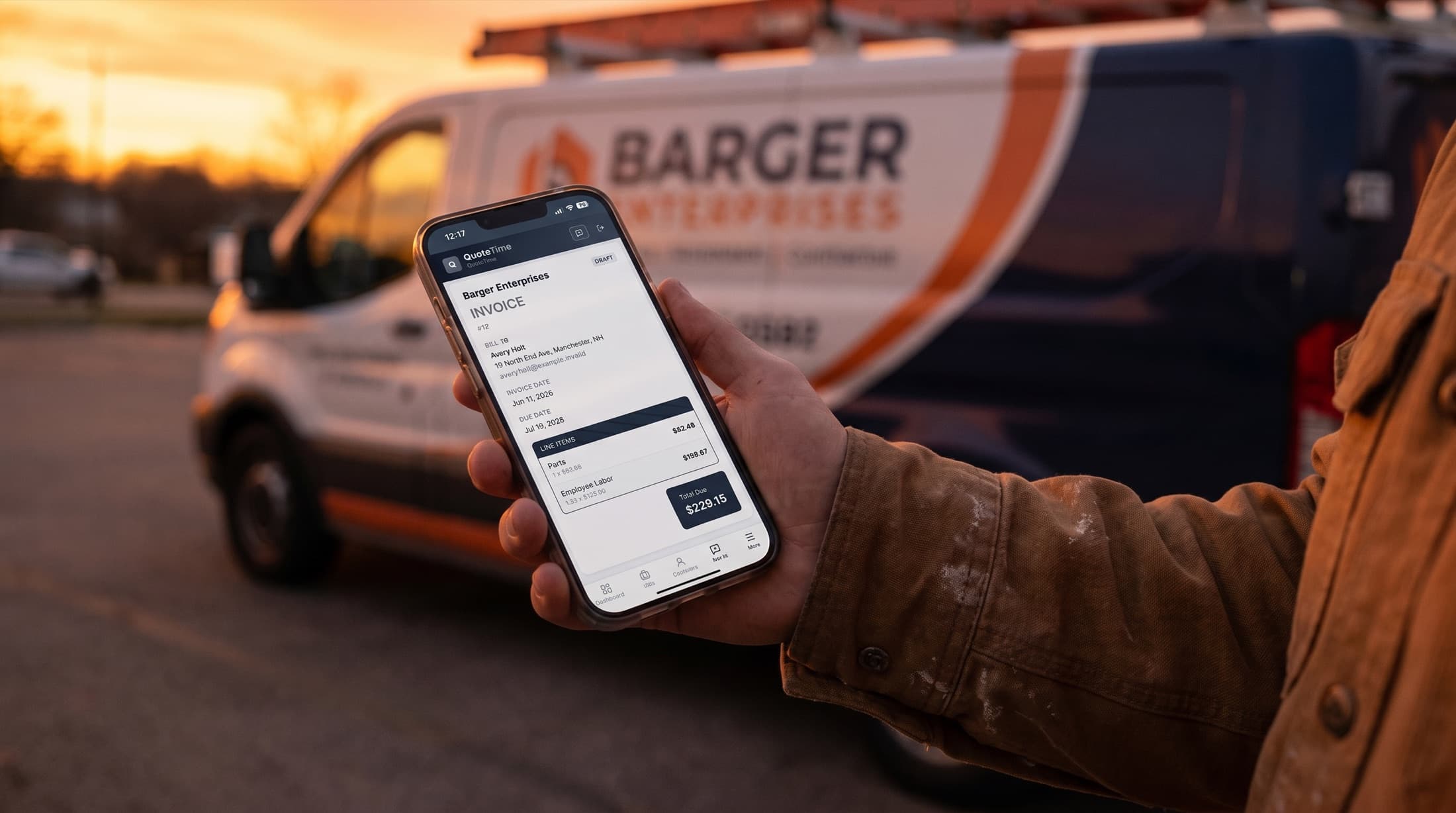
Know what every job actually made.
Quote it, get it signed, run the job, invoice it — QuoteTime tracks time and costs while the job runs, so profit per job is a number you look up, not a feeling you argue with.
Built inside a working plumbing company. $79/month flat, unlimited users.
The problem
Busy all month. So why does the account look like that?
The trucks ran every day. The crew got paid. The phone didn't stop. And at the end of the month the bank balance still doesn't match how hard everyone worked.
So one night you're at the kitchen table at 3am with a spreadsheet, a stack of receipts, and a bank statement, trying to reconstruct which jobs made money. The spreadsheet doesn't know. It wasn't there.
QuoteTime was there. It held the quote, watched the hours get logged, collected the costs while the job ran, and sent the invoice. By the time you're asking “did that job make money?” — it already has the answer, in dollars, per job.
How it works
Five steps. Start to “here’s what it made.”
Quote it.
Build the bid from your price book — your rates, your line items, your logo on the PDF. What the customer sees looks like it came from a company twice your size, because the numbers underneath are all yours.
The customer signs online.
They get a link, not an attachment to lose. One button to accept, a real drawn signature, and the acceptance evidence goes right on the PDF. No printing, no “did you get my email?”, no chasing.
Run the job.
Your crew logs in with a PIN from their phones — no accounts to manage, no per-seat charge for the new guy. Hours land on the job as they're worked. Costs land on the job as they're spent.
Invoice it.
A branded PDF, emailed from the app. Nothing sends until you approve it, and every send logs a receipt — you can always see what went out and when.
See what it made.
Quoted vs. actual, labor at the rates that were true when the job ran, profit per job in dollars. Export any of it to CSV. This is the part the spreadsheet was supposed to do.
The differentiator
The office manager a small shop can't usually afford.
There's an assistant inside QuoteTime. Not a chatbot that answers questions about the help docs — an agent that can do the work. If you can do it in the app, you can ask for it.
Say things like:
You say
“Invoice the Hendersons for the water heater swap — labor plus the 50-gal tank from my price book.”
It does
Drafts the invoice at your price-book rates and hands you a link to it. It does not send it. You do.
You say
“What did the Maple Street remodel actually make?”
It does
Pulls the quote, the hours, and the costs, and gives you the number — with a link to the job so you can check its work.
You say
“Which invoices are still unpaid?”
It does
The list, with links.
You say
“Set up Granite State Supply as a vendor.”
It does
Creates the vendor record and links you to it.
You say
“Add a price line: copper rough-in, $85 an hour.”
It does
Added to your price book at your number — the number you said.
Three rules it lives by:
AI does the busywork.
Drafting, looking up, writing up — the office hours you do at night.
You set every price.
There is no field where it can make one up. Every dollar on every document is one you typed or one you approved.
Nothing sends without you.
Anything customer-facing waits for your explicit go-ahead. Every send logs a receipt.
And one more, for shops with a crew: it can only do what you can do. The agent runs under each person's own login and permissions. A field worker asking it questions sees field-worker answers — your margins aren't in there.
Where it comes from
Born in a plumbing shop, not a pitch deck.
QuoteTime started as a system I built for a working New Hampshire plumbing company — quotes, job costing, field time tracking, invoices, the whole spine. It still runs their shop every day.
What you're looking at is that system, rebuilt properly so any small trades company can run on it. It wasn't designed by asking contractors what they want in a survey. It was built next to the trucks.
No customer counts on this page and no star ratings — I'd have to invent them, and this page doesn't do that.
Built in the open
You can watch it get better.
Every update that ships is listed and dated in the changelog — the same “what's new” your account shows after every release. No silent changes, no mystery versions.
And when something's wrong, you don't file a ticket into the void. You tell the person who wrote the code, and you'll recognize the fix in the next changelog entry with your fingerprints on it. Early shops don't just get the founding rate — they get a say.
Straight answers
The features I didn't build.
You've read enough software pages that promise everything. Here's the opposite list.
It doesn't process your customers' card payments. You record payments; you keep getting paid the way you get paid now — check, transfer, card reader, cash. The big platforms make their real money skimming 2.6–2.9% off every invoice you collect. QuoteTime's price is the price.
It doesn't sync with QuickBooks. QuoteTime runs the front office — quotes, jobs, invoices, profit. It doesn't replace your bookkeeping, and I won't pretend a checkbox integration is coming next week when it isn't.
It doesn't text your customers. If a text needs sending, you'll send it.
It doesn't do scheduling or dispatch. Deliberately. QuoteTime is for quote-driven shops — bid the work, run the work, invoice the work. If your business lives and dies by a dispatch board and route maps, you're the customer the big platforms are actually built for, and you should use one.
No GPS tracking, no marketing campaigns, no inventory module. Those are the add-ons that turn a $59 subscription into a $200 one. They're not here, and they're never going to appear on your bill as a surprise.
If your shop runs quote → job → invoice, this is the whole spine, at one flat price, with nothing bolted on.
Pricing
One price. The whole company.
$79/month
Flat. Unlimited users. Everything included.
- Unlimited quotes, invoices, and jobs
- Online acceptance with drawn signatures
- Job costing and profit per job, with CSV export
- The Ask agent, for every user
- Your whole crew — the office and every truck, no per-seat fees
- Your branding on every customer-facing page and PDF
- Cancel anytime; it just stops billing
7-day free trial. No card required to start.
Start your free trialFor the first shops
The founding rate: $49/month, locked.
QuoteTime is new, and I'm not going to pretend otherwise. The first shops that sign on are taking a chance on new software — so the deal goes both ways.
Sign up as a founding customer and your rate is $49/month instead of $79, locked in for as long as you keep the subscription. Your price never goes up — not at renewal, not when the feature list grows, not ever.
In return, I'll ask you what's broken and what's missing, and you'll watch it get fixed by the person you told. That's the trade. No countdown clock — when I have the founding shops I need, the rate closes to new signups. Yours stays.
Claim the founding rateThe math against per-seat pricing (their published prices, checked June 2026)
Jobber's $29 plan is one user. Add a second person and you're on the $99/month plan — $139 if you pay monthly — plus $29 for each user past five. Housecall Pro's real entry lands around $149/month once you need the estimate builder and QuickBooks sync, which most shops hit within a couple of months. A four-person shop realistically pays $99–$170/month before a single add-on.
QuoteTime is $79 whether you're two people or ten. The tenth hire costs you a wage, not a software line item.
Questions
Asked straight, answered straight.
Is the AI setting my prices?
No, and it can't. The agent drafts documents and splits jobs into line items, but every dollar figure comes from your price book or your keyboard. There is no field where it can invent a price. And nothing it drafts goes to a customer until you approve the send.
What does $79 actually cover? What's the catch?
Everything on this page, for everyone in your company. Not per person, not plus credits, not plus a setup fee. For comparison: Jobber is $29/month for one user and $99+/month the moment you have a crew; Housecall Pro's real entry is about $149/month once you need the estimate builder and QuickBooks sync (their published pricing, June 2026). The catch is the section above — the features I deliberately didn't build.
What happens when my trial ends?
You'll be asked to subscribe. That's it. Your quotes, jobs, customers, and records stay exactly where they are — nothing gets deleted, nothing gets held hostage. Subscribe and you pick up where you left off.
Can I get my data out?
It's your data. Reports and job data export to CSV today. A full-account export button is on the near-term list; until it ships, ask me and I'll pull everything for you. Leaving should never require a phone call, and it doesn't.
Does it work on my phone in the field?
Yes. QuoteTime runs in the browser and installs to the home screen like an app — no app store, no separate download, no per-device fee. Field workers get a PIN login from their phones to see their jobs and log their time. You can approve and send a quote from the truck.
How do my customers pay me?
The way they pay you now — check, transfer, card reader, cash. You record the payment against the invoice and the job math updates. QuoteTime doesn't process card payments, which also means nobody is skimming a percentage off your invoice on the way through.
Does it sync with QuickBooks?
Not today. QuoteTime runs the front office; your bookkeeping stays your bookkeeping. I'd rather tell you that plainly than gate a half-built checkbox behind a higher tier.
Who can see my numbers? What about security?
Your company's records are walled off from every other company on the platform, and that boundary is enforced on every single request — it's the first thing checked, not an afterthought. Field-worker PINs are stored hashed, never as plain text. When you subscribe, your card goes to Stripe — I never see or store the number. Every send and every admin action is logged, and automated checks run against every code change before it ships.
It's one guy. What happens if you get hit by a truck?
Fair question — I'd ask it too. Three honest answers. First, your data lives in a standard database, not something proprietary, and you can get it out (see above). Second, the code is deliberately boring and disciplined — it's built to run without a babysitter, and it does. Third, I run my own company on QuoteTime every day. This isn't a side project I can quietly walk away from; it's my office too.
Do I have to import anything to get started?
No. Start with your next job: quote it, send it, run it. Your price book builds up as you go. The first estimate comes from your next phone call, not a data migration.
Who's behind this
QuoteTime runs Barger Enterprises — the company that built it. I use it on real jobs. When something's slow, I fix it. When something works, it stays. Tenant zero isn't a demo account.
I'm one person, which means you'll never be routed through three support tiers to reach someone who's seen the code. You're already talking to him.
— Bill Barger, founder
Run a tight shop.
Do the job. QuoteTime does the office.
Start free — no card requiredLive in about 60 seconds. Cancel anytime — it just stops billing.